
Download ToodleDo – Chrome Apps, ToodleDo app, ToodleDo productivity tool
Overview
ToodleDo is a desktop application designed to help users manage tasks and stay organized across multiple devices. Built as a Chrome App, it offers a streamlined interface for tracking to-dos, setting priorities, and organizing projects. The software is intended for individuals seeking a reliable task manager that supports both online and offline usage. Its primary purpose is to simplify daily planning, improve time management, and reduce the cognitive load of remembering tasks. The app caters to students, professionals, and personal users who rely on digital tools to maintain productivity.
Although the developer, ToodleDo, has officially ended support for this app, it continues to function as intended with minimal reported issues. This makes it a stable option for users who already depend on its workflow. The application runs on both Windows and Mac platforms, offering cross-platform consistency. Real-world usage includes managing work assignments, tracking personal goals, and coordinating team projects. Despite the lack of ongoing updates, the app remains functional for those who value simplicity and reliability in task management.
Key Features & Capabilities
- Task Management – Create, edit, and organize tasks with due dates, labels, and priorities. Ideal for managing daily workflows and long-term projects.
- Offline Access – Continue using the app without an internet connection. Changes sync once connectivity is restored.
- Cross-Platform Sync – Access your task list across devices, including desktop, mobile, and web.
- Intuitive Interface – Clean, minimal design that emphasizes usability and quick task entry.
- Customizable Workflows – Use folders, labels, and recurring tasks to tailor the experience to personal or professional needs.
These features support users in maintaining focus and reducing task overload. For example, a student can use recurring tasks to track weekly study sessions, while a project manager might assign due dates and labels to track deliverables. The ability to work offline ensures uninterrupted productivity during travel or in low-connectivity environments. While the app no longer receives updates, its core functionality remains effective for consistent task tracking.
User Interface, Workflow & Performance
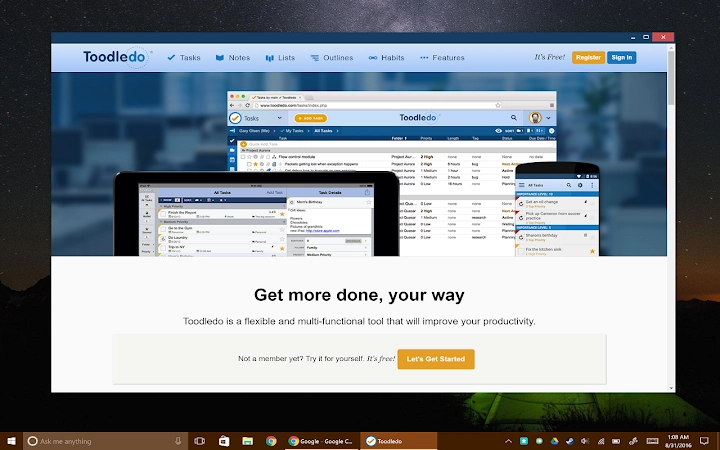
The user interface of ToodleDo is designed around simplicity and efficiency. The main window displays a clear list of tasks, with options to filter by due date, priority, or label. Navigation is straightforward, relying on a sidebar for access to folders and settings. Task creation is quick, with a dedicated input field at the top of the screen. The workflow prioritizes speed and minimal distractions, allowing users to add and complete tasks with minimal clicks.
Performance is consistent with typical desktop applications of its type. The developer did not specify resource usage details, but based on general software behavior, it operates smoothly on modern systems. Stability appears reliable, with no widespread reports of crashes or freezes.
CPU and RAM usage are expected to remain low during normal operation. The app launches quickly and responds promptly to user input. While performance may vary slightly depending on system configuration, it maintains a responsive feel under typical workloads.
Compatibility & System Requirements
ToodleDo is compatible with both Windows and Mac operating systems. The application is available as a desktop app for these platforms, supporting modern versions of each. The installation size is 500 MB, which is typical for a feature-rich desktop utility. The developer did not provide additional system requirements, so users should ensure their device meets general standards for running desktop applications.
Exact system requirements were not listed. Compatibility information was partially provided. Users should verify that their system supports Chrome Apps, as this is the underlying technology.
For Windows, this typically requires a compatible version of Chrome. On Mac, the app runs on macOS versions that support Chrome-based applications. The app may not function on older or unsupported operating systems.
Pros and Cons
Pros
- Simple, intuitive interface ideal for quick task entry
- Supports offline task management and syncs when online
- Available for both Windows and Mac platforms
- Stable performance despite discontinued support
- Free to download and use
Cons
- No longer receiving updates or technical support
- Dependent on Chrome Apps technology, which is deprecated
- Limited customization options compared to modern task managers
- May become incompatible with future OS or browser changes
- File size of 500 MB may be considered large for a simple task tool
FAQ Section
Is ToodleDo compatible with Windows and Mac?
Yes, ToodleDo is available as a desktop application for both Windows and Mac operating systems.
Is the app secure to use?
The app functions as a Chrome App and uses standard web security protocols. However, since support has ended, no new security patches are being issued.
Can I use ToodleDo offline?
Yes, the app supports offline access. You can create and manage tasks without an internet connection, and changes will sync once connectivity is restored.
Does ToodleDo require a subscription?
No, ToodleDo is free to download and use. There is no paid version currently available.
Will ToodleDo continue to work in the future?
While the app continues to function as is, future changes by Google or operating system updates may affect its compatibility. The developer has ended all support.
Final Thoughts + CTA
ToodleDo remains a solid choice for users who value a straightforward, reliable task manager. Its clean interface and offline functionality make it suitable for daily planning and personal organization. Although support has officially ended, the app continues to operate without major issues. For users who depend on its current workflow, it offers a stable and free solution. However, long-term viability may be at risk due to its reliance on deprecated technology.
Those seeking a simple, no-frills task manager that works offline and across devices should consider downloading ToodleDo now. It’s a free, lightweight tool that delivers consistent performance for basic to intermediate task management needs.
Download ToodleDo now







